before you jump to conclusion or point me to this previously closed post about file upload API,
This post DO NOT clarify how to transfer this into a webhook interface callable via typescript
my ask is as follows:
On filteration of an object table (via object filter in LHS section) I want to call a function (Download as Excel) which would trigger a code that creates a highly customized tabbed excel with multiple worksheet (one tab per groupBy clause) and certain aggregations in each tab.
My worry is not using TwoDimensionaAggregation which i have done many times before, its in the file upload API itself.
When i call the API via Postman, it provides a clean interface to provide attachment via choosing a file from your file system (which most of the API calls in the highlighted post points to) and if you convert the postman to CURL it translate to not so helpful:
curl --location ‘``https://[host]/api/v1/datasets/ri.foundry.main.dataset.[...]/files:upload?filePath=some_file.xlsx’``
–header ‘Content-Type: application/octet-stream’
–data ‘@e:\Projects\some_folder\some_file.xslx’
In it that its not revealing the portion where its converting this local filepath into octet-stream before upload
However trying to do that in a foundry function, where you generate an excel in memory using the filtered objectset and then try to pass to that webhook via attachment object is absolutely not documented anywhere, NOR is the webhook quick test card even capable of doing that, it clearly highlights that “Attachments are not supported in webhook test interface”

Nor is it documented anywhere in your data connection example doc for Rest API,
the one and only example you have of Attachment is very rudimentary and it talks about grabbing attachment from an ontology object, which is very different from using Attachment as an API to upload something with binary octet-stream to any rest API endpoint / webhook
Trying to do that in typescript yields me 404, which must be a deceiving message because it didn’t like what i passed to it, as i can do this just fine from postman
here is screenshot of each tab of my rest API webhook:
- Input parameters:
- request settings

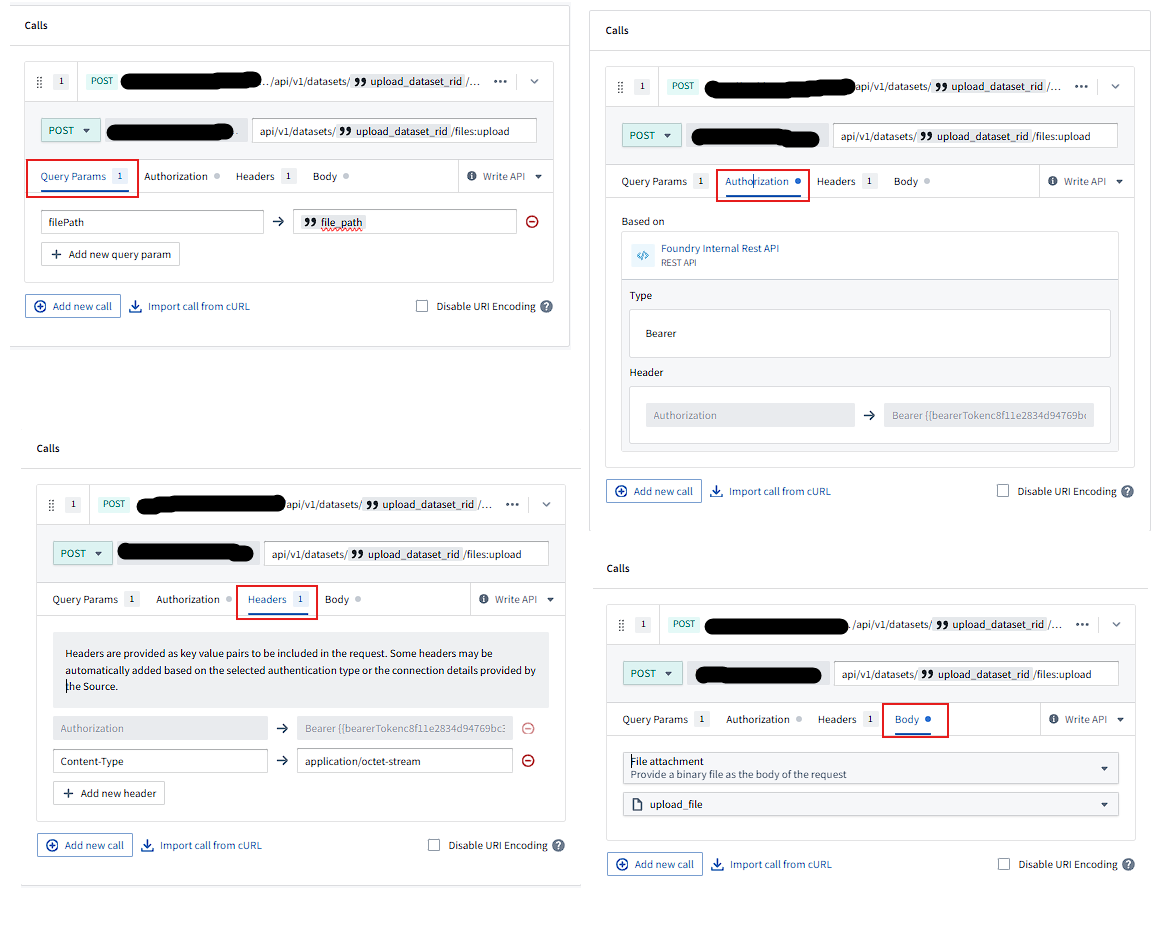
And here is the code calling the said webhook on said data connection:
import { Sources } from "@foundry/external-systems";
import { Function, OntologyEditFunction, Edits, Integer, UserFacingError, Result, WebhookResponse, RestWebhookError, Attachments, isOk } from "@foundry/functions-api";
import {
    ObjectSet,
    ExampleAircraft,
    Categories,
    Objects,
    Order,
    DownloadOrdersExcelReport
    } from "@foundry/ontology-api";
import axios from "axios";
import * as ExcelJS from 'exceljs';

// Uncomment the import statement below to start importing object types
// import { Objects, ExampleDataAircraft } from "@foundry/ontology-api";

const XLSX_MIME_TYPE = 'application/vnd.openxmlformats-officedocument.spreadsheetml.sheet';


    // writing this code on dummy Northwind orders object
    @OntologyEditFunction()
    @Edits(DownloadOrdersExcelReport)
    public async saveOrdersAsExcel(
        orders: ObjectSet<Order>
    ): Promise<void> {
        const MAX_COUNT = 1100;
        // replace this token with the one generated off of your third party app's client id an client secret
        // const BEARER_TOKEN = "{my_personal_token}" not needed as this is inherited from parent data connection
        const FOUNDRY_STACK_URL = "https://myDomain.aws-region.palantirfoundry.com"
        const TARGET_DATASET_RID = "ri.foundry.main.dataset.[...]"
        const count_of_orders = await orders.count();
        if (count_of_orders && count_of_orders >= MAX_COUNT) {
            throw new UserFacingError(`Cannot process records over ${MAX_COUNT}, provided object with count: ${count_of_orders}`)
        }
        const ordersArray = orders.all();
        try {
            // --- 1. Create an Excel file in memory ---
            console.log("Creating Excel workbook in memory...");
            const workbook = new ExcelJS.Workbook();
            const worksheet = workbook.addWorksheet('Orders Export');

            // Define columns based on the 'Categories' ontology schema
            worksheet.columns = [
                { header: 'Order ID', key: 'order_id', width: 30 },
                { header: 'Customer ID', key: 'customer_id', width: 30 },
                { header: 'Employee ID', key: 'employee_id', width: 50 },
                { header: 'Order Date', key: 'order_date', width: 20 },
                { header: 'Shipped Date', key: 'shipped_date', width: 20 },
                { header: 'Required Date', key: 'required_date', width: 20 },
                { header: 'Ship City', key: 'ship_city', width: 20 },
                { header: 'Ship Country', key: 'order_date', width: 20 }
            ];

            // Add each category object as a new row
            // Simply adding data as is, as doing funky TwoDimensionalAggregation is not my concern yet
            ordersArray.forEach(order => {
                worksheet.addRow({
                    order_id: order.orderId,
                    customer_id: order.customerId,
                    employee_id: order.customerId,
                    order_date: order.orderDate,
                    shipped_date: order.shippedDate,
                    required_date: order.requiredDate,
                    ship_city: order.shipCity,
                    ship_country: order.shipCountry,
                });
            });

            // Convert the workbook to a binary buffer
            const buffer = await workbook.xlsx.writeBuffer();
            console.log("Successfully created Excel buffer.");
            console.log("Preparing to upload file to Foundry dataset...");
            const fileName = `categories-export-${new Date().toISOString()}.xlsx`;

            // --- FIX: Convert Node.js Buffer to standard Blob object ---
            // The global Blob constructor is usually available in the execution environment
            const excelBlob = new Blob([buffer], { type: XLSX_MIME_TYPE });

            // Construct the API endpoint for file upload
            const attachment = await Attachments.uploadFile(fileName, excelBlob)
            const webhookResponse = await Sources.FoundryApiConnection.webhooks.UploadDataToOrdersReports.call({
                upload_dataset_rid: TARGET_DATASET_RID,
                file_path: fileName,
                upload_file: attachment
            })

            if(isOk(webhookResponse)) {
                const webhookOutput = webhookResponse.value.output;
                const jsonString = webhookOutput.response_json;
                try {
                    // Parse the JSON string into the desired type
                    const response: FileUploadWebhookOutput = JSON.parse(jsonString);

                    console.log("File uploaded successfully. Parsed Response:", response);
                    // You can now access properties like response.path, response.transactionRid, etc.
                    console.log("File uploaded successfully. API Response:", response);
                    // return JSON.stringify(response);

                } catch (e) {
                    console.error("Failed to parse the JSON string from the webhook response.", e);
                    throw new UserFacingError("Invalid JSON format received as a response from the folowing `Data Connection -> webhook`: `Foundry Internal Rest API > Upload a file to dataset`.");
                }
            }
            else {
                console.error(`Error name: ${webhookResponse.error.name} \nError Cause: ${webhookResponse.error.cause} \nError Message: ${webhookResponse.error.message} \nError stack:${webhookResponse.error.stack}`)

            }
            // Return the JSON response from the upload API
            // return "respond not OK";
        } catch (error) {
            console.error("Failed to create or upload the Excel file.", error);
            if (axios.isAxiosError(error) && error.response) {
                console.error(`Axios Error: ${error.response.status} ${error.response.statusText}`);
                console.error(`Response Data:`, error.response.data);
            }
            throw new Error("An error occurred during the Excel export and upload process.");
        }
    }
The problem with this is when i try to call:
const webhookResponse = await Sources.FoundryApiConnection.webhooks.UploadDataToOrdersReports.call({
                upload_dataset_rid: TARGET_DATASET_RID,
                file_path: fileName,
                upload_file: attachment
            })
and check if response is ok, it goes in else block and reports this error:
LOG [2025-09-30T00:02:04.873Z] Creating Excel workbook in memory...
LOG [2025-09-30T00:02:05.469Z] Successfully created Excel buffer.
LOG [2025-09-30T00:02:05.469Z] Preparing to upload file to Foundry dataset...
ERROR [2025-09-30T00:02:07.036Z] Error name: RemoteRestApiReturnedError
Error Cause: undefined
Error Message: Request to external system failed and returned unsuccessful response code: 404 Response body:
Error stack:undefined
I guess my question boils down to, How to use the Attachment object to create an In-memory octet-stream from scratch (and not grab an existing one from an ontology object)
Even this one and one post about attachment doesnt help, as it boxes the attachment definition to a very narrow one as an API to attach stuff to objects only, in which case, why does the Webhook request param asks for Attachment as the input for any general octet-stream upload?


