Hi, I would like to create workshop app with several object tables, charts, filters etc., each of them on single separate page (around 6-8 pages total). So far almost everything is done, but I struggle with navigation. I would like to have some kind of “home” page with xy buttons, where each button will redirect the user to the concrete page with object tables, charts etc. The issue I have is that when I create such page with 6-8 buttons, it looks ugly. Mainly because it seems like it is not possible to adjust buttons height, so I end up with 6 buttons very wide but also very low. My goal is to have a page, that is fully covered by buttons that expand to take all the space of the page, for example as shown on image below. Do you have any ideas? One of my ideas was to have 2x3 layout and expand the button group and its one button to take all of the fragments space, but I havent find working solution.

Hi @MVP we use for all our landing pages metric cards that are just linked to the switch page event.
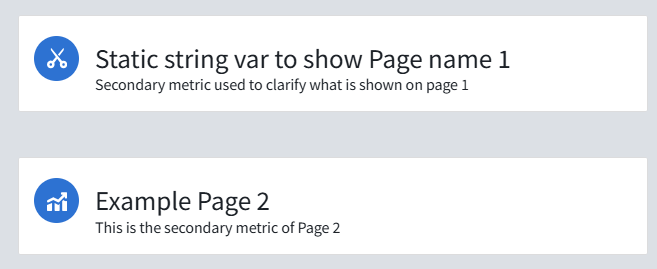
To get this design:
- create a new metric card in card style
- set the template to stacked
- set the icon style to prominent and circle
- the primary page name is the string variable of the metric card itself (you need to create a static variable for that)
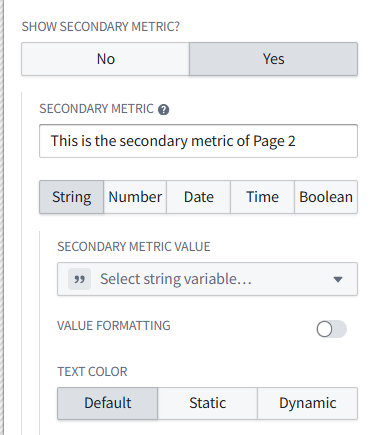
- the additional description is just the secondary metric. Here you don’t even need to use any variable
- Important: set the Display options to be borderless and without background so that the thin grey line around the metric card disappears.



That is a pretty awesome solution <3
Hi @Phil-M,
thank you for your detailed step-by-step guide, good job, I appreciate it. I will definitely use your solution, even though it is not what I have been hoping for. Do you or anybody else have any idea why is the design of workshop so poorly customizable? Everything has some default settings which is great, but I would expect a bit more flexibility. The reason I ask is that I have feeling I am not using the right tool for simple app or I am missing something important. Environment where you can do so many things but dont have any design flexibility makes me feel like maybe I am the problem 


This is the configuration that will get what you want. Unfortunately, I don’t think making the button taller will make it look nicer ..
For tabs, especially if you are navigating across pages, you can look at the “Tabs” widget:
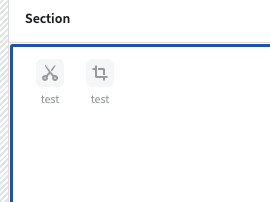
Which itself has as well many options, allowing for different shapes and forms.


And as highlighted above, you have alternative options based on other widgets: loop layout, metrics cards, etc.
If you are looking for more customazibility, you can look into Slate or even Custom React widget (which can be embedded into Workshop)
Hi @MVP I can’t fully agree with your comment on missing flexibility. Yes, headless UI is not yet supported (frequent feature request). But since most of the navigation widgets (and also others) can emit events you can trigger navigation from almost everywhere - it is just a bit about creativity 
If there is one thing I’d ask for, it would be the option on buttons to also “fill available vertical Space”.

@Phil-M The ‘fill vertical’ toggle is exactly what I had on my mind as well and what I have been searching for, hopefully we get at least this in the future. I know you can trigger navigation from many places, but customizable button is in my opinion still the simplest way and much better than doing workarounds like this. Forcing users using widgets they dont want to use just to get some desired design doesnt feel right to me.
Hopefully the request will be fulfilled Thank you for your time!
@VincentF Do you have any documentation on Custom React widgets you can recommend? For now I will stick with @Phil-M solution, but for future cases this could be useful.
For custom react widget, I posted a tutorial that should be step by step on how to achieve this. There is work in progress to make that more one-click ! https://community.palantir.com/t/how-to-create-a-custom-widget-for-workshop/2182/2
Maybe a Tabs widget? Something like this video, minute 35:00 Applied Notional Project